ADA Compliance Checker AccessiBe: Full Review, Accuracy, and Limitations
Updated on January 12, 2026
Why We Reviewed the AccessiBe ADA Compliance Checker
At tabnav, accessibility is what we work on every day. Our team includes in-house accessibility experts and engineers who test websites across different industries and use cases.
We don't rely only on automated scans. We spend a lot of time validating results through real testing and practical experience.
We decided to review the accessiBe checker because it's one of the most searched tools in the accessibility space. Many teams encounter it early when they start looking for a way to check compliance.
We wanted to see how it performs beyond marketing pages.
Our team tested the checker end to end. That includes how it runs, what it reports, what it catches well, and where it starts to fall short.
We looked at it from the perspective of designers, developers, and website owners who need clear answers and realistic expectations.
In this review, you'll learn how the tool works, where it adds value, and where it should not be relied on alone. The goal is to help you decide if it fits your needs and how to use it responsibly as part of a broader accessibility process.
AccessiBe Checker: Product Overview and Positioning
AccessiBe is one of the earlier companies that pushed web accessibility into the mainstream.
At a time when accessibility was mostly handled through manual audits and niche consulting, they focused on making accessibility tools easier to adopt at scale. From our perspective, that mattered.
They invested heavily in product development and education, making accessibility more visible for website owners, marketing teams, and agencies.
That investment shows in the breadth of their tooling, not just in market presence.
Today, AccessiBe offers more than a single checker.
The ADA compliance checker AccessiBe, often called accessScan, is the entry point. It's designed for fast, no-setup scans that surface common accessibility issues and give teams a quick snapshot of where problems exist.
Beyond the checker, AccessiBe also offers accessFlow, a broader accessibility monitoring platform.
accessFlow is built for teams that need ongoing coverage and deeper integration.
It includes developer-focused capabilities like IDE-level insights through MCP integration and automated testing via an SDK that fits into CI/CD workflows.
These features are aimed at larger or more technical teams managing accessibility continuously, not just running one-off scans.
Free Web Accessibility Checker
Enter your website URL to get a free, instant accessibility scan with tabnav's checker.

Pros and Cons of the accessiBe Checker

Pros
Robust detection of complex static issues
Most accessibility checkers are limited to basic, static issues. These usually include missing alt text on images or elements that lack accessible names through text nodes or ARIA attributes.
accessiBe goes further than that.
The checker is designed to detect more complex static issues that often fall outside the scope of standard automated tools.
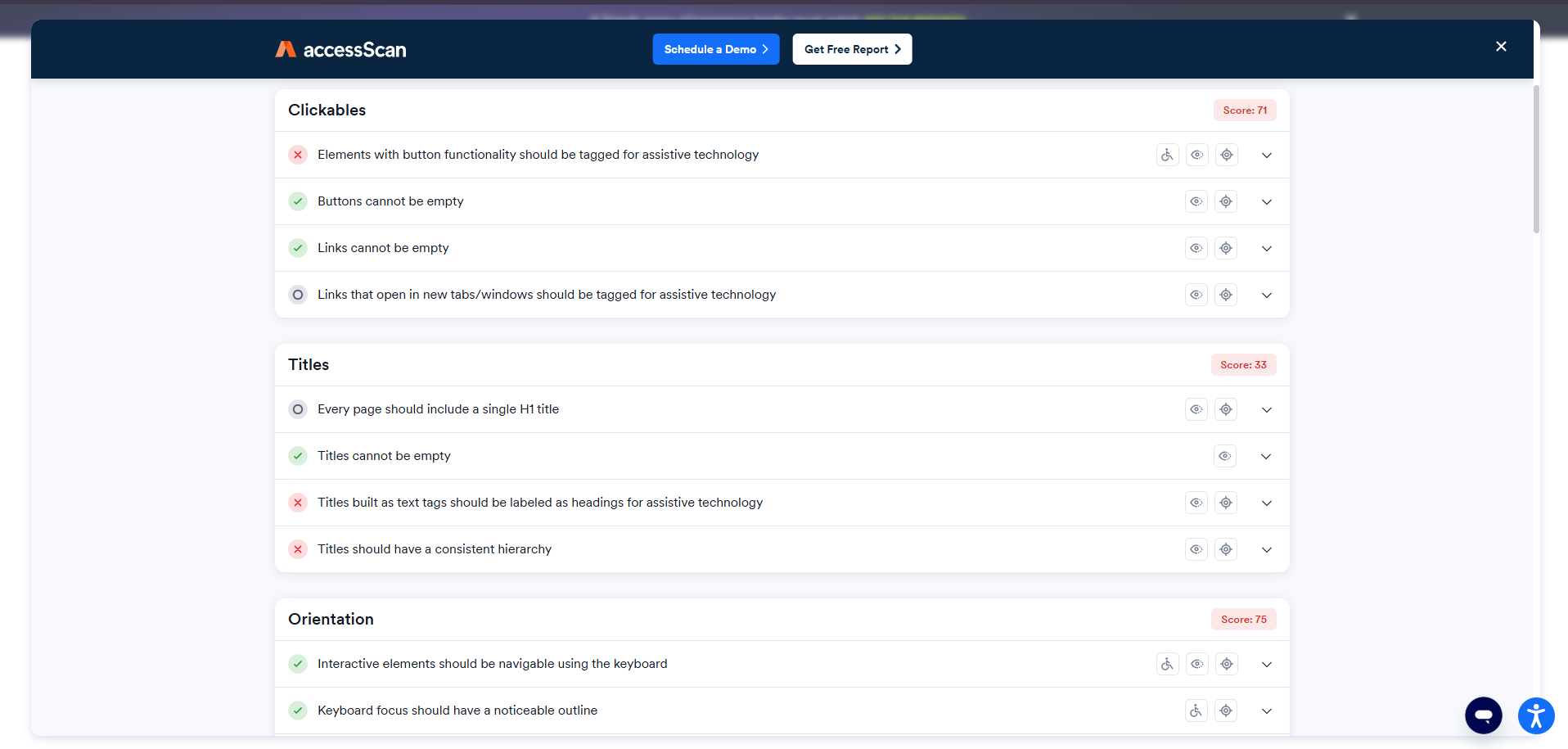
One example is the check titled "Elements with button functionality should be tagged for assistive technology." This test identifies custom-built elements that visually and functionally behave like buttons but are not coded as such.
The checker evaluates whether these elements are missing critical ARIA roles, required attributes for assistive technologies, and keyboard interaction properties like tabindex, which are essential for keyboard users.
This level of detection is meaningful. Issues like these are often discovered only during manual accessibility audits, not through typical automated scans.
Clear and straightforward user experience
Many accessibility checkers feel cluttered or difficult to navigate. Important information is often buried, which makes the results harder to act on.
accessiBe's checker takes a simpler approach. Issues are grouped by page components such as menus, carousels, tables, forms, titles, and clickable elements.
This structure makes it easier to understand where problems exist and how they relate to specific parts of the page. As a result, reviewing findings and planning fixes feels more efficient and less overwhelming.
Fast report delivery
The average waiting time for an accessiBe report is approximately 30 seconds from the moment the scan is initiated. This is an impressive turnaround time given the depth and quality of the checks performed.
Unlimited usage
accessiBe's free checker allows unlimited scans. After reviewing the results, you can apply the suggested fixes and immediately rerun scans at no cost, making iterative improvements easy and accessible.
High accuracy
Many accessibility checkers are known for producing false positives, flagging issues that are not actually present or relevant.
In our testing, accessiBe's checker showed a higher level of accuracy than many standard tools. We tested it across different websites, including pages with complex layouts, custom components, and dynamic sections.
Most of the reported violations reflected real accessibility issues on the page, which makes the results more practical to review and easier to act on.
Cons
Lack of simulation-based testing
accessiBe's checker does not include advanced simulated interaction tests. For example, it does not verify keyboard tabbing behavior in dialogs or whether menu items can be opened and closed using the keyboard. These aspects must be tested manually.
Not suitable as a working dashboard
The free checker does not function as a task-management dashboard. Users cannot mark issues as "resolved", adding team members, or reorganize results by WCAG success criteria. The interface remains fixed, requiring repeated scans to reflect updates.
No authenticated scans
The tool cannot scan pages behind a login, such as dashboards or authenticated web application areas. Pages that require user authentication are not supported in the free checker.
Form submission required
To view each report, users must provide their name and email address. This information must be submitted every time a new scan is initiated.
Not a full WCAG compliance report
While the checks provided are high-quality and accurate, accessiBe's free checker does not cover all WCAG success criteria and techniques. For full website compliance and continuous monitoring, AccessiBe's paid monitoring services should be considered.
Who the AccessiBe Checker Is Best For
Small teams and lean organizations
The checker works well for small teams that need a fast way to identify accessibility issues without dedicated accessibility staff. It's useful when resources are limited and quick visibility is needed.
Marketing teams and site owners
Non-technical users benefit the most here. Marketing teams, content managers, and site owners can run scans and understand high-level issues without involving developers right away.
Agencies handling multiple sites
Agencies can use the checker as a first-pass review tool when onboarding new clients or auditing pages before deeper work begins.
As a first step in accessibility testing
The tool makes sense as an entry point. It helps answer whether accessibility issues exist before committing to more involved testing.
When it shouldn't be the only solution
For complex websites, web apps, or compliance-sensitive environments, this checker should not be the only tool used. Manual testing and ongoing monitoring are still required for long-term accessibility work.
Limitations to Understand Before Relying on Any Accessibility Checker
No automated accessibility checker can catch everything. Tools are great at identifying patterns and common issues, but accessibility often depends on context, intent, and real user interaction.
Some issues almost always require manual testing. Keyboard flow, focus order, screen reader experience, form usability, and dynamic components are areas where human review is still essential.
Relying on a single scan can also create a false sense of confidence. A page may pass today and fail tomorrow after a content update, design change, or new component is added.
This is where expectation setting matters. An ADA compliance checker, including tools like the AccessiBe checker, works best as an early signal, not a final verdict.
Ongoing testing is what keeps a site accessible over time. Accessibility is not a one-time task. It's a process that needs to be repeated as websites evolve, content changes, and new features are introduced.
Understanding these limits helps teams use checkers correctly, without over-relying on them or expecting them to replace deeper accessibility work.
Final Takeaways and What to Know Before Choosing an ADA Compliance Checker
After testing the ADA compliance checker AccessiBe end to end, the takeaway is clear. It's a fast, accessible tool that helps surface common accessibility issues and gives teams an initial sense of where problems exist.
AccessiBe makes sense when you need a quick first step. For site owners, marketing teams, and agencies, it's a practical way to spot obvious gaps without technical setup or deep accessibility knowledge.
At the same time, no checker should be treated as a complete solution. More complex issues, real user flows, and assistive technology behavior still require manual review or additional tools, especially for larger or more dynamic websites.
The key is using an ADA compliance checker as part of a broader process, not as a final answer. When combined with ongoing testing and expert review where needed, tools like AccessiBe can play a useful role in building and maintaining accessible websites.
If you're comparing options, it's also worth looking at the tabnav Accessibility Checker, which is built to provide clear issue detection alongside practical guidance and ongoing monitoring. Using the right checker in the right context is what leads to better accessibility outcomes over time, not fear-driven decisions or one-time scans.
This article is an independent review. accessiBe is a registered trademark of its respective owner and is not affiliated with tabnav.

You might also like...