ADA Compliance Audit: A Practical Guide for Website Owners
Updated on January 10, 2026
Most people don't think twice about using a website. They click, scroll, fill out a form, and move on. But for users who rely on keyboards, screen readers, or other assistive technologies, many websites quietly fail at the most basic tasks.
These failures aren't just usability problems. They're also the reason thousands of ADA website lawsuits are filed every year. In many cases, legal action starts with simple issues—broken keyboard navigation, inaccessible forms, or content that assistive technologies can't interpret correctly.
An ADA compliance audit helps surface these risks early. It shows where real users get blocked, where interactions break down, and where your site may be exposed to legal claims. Instead of guessing or relying on surface-level scans, an audit gives you clear, actionable insight into what actually needs to be fixed.
This guide explains what an ADA compliance audit involves, how it works in practice, and how to use it to reduce legal risk while keeping your website accessible as it continues to change.
What Is an ADA Compliance Audit
An ADA compliance audit is a structured evaluation of a website against accessibility standards used to meet ADA requirements.
While the ADA itself does not list technical website rules, courts and regulators consistently rely on the Web Content Accessibility Guidelines, WCAG, as the benchmark for digital accessibility. As a result, most ADA compliance audits are WCAG-based audits.
The goal of an audit is to identify accessibility barriers that affect users with disabilities, including people who rely on screen readers, keyboard navigation, voice input, or other assistive technologies.
An ADA compliance audit typically reviews:
- Keyboard accessibility
- Screen reader compatibility
- Focus behavior and navigation order
- Color contrast and text readability
- Form labels and error handling
- Dynamic content such as modals and popups
- Images, media, and alternative text
Free Web Accessibility Checker
Enter your website URL to get a free, instant accessibility scan with tabnav's checker.

Why an ADA Compliance Audit Matters
An ADA compliance audit is not just about best practices. It's about avoiding real legal and financial risk.
Many ADA website lawsuits start with simple problems. Broken keyboard navigation, inaccessible forms, or missing labels are often enough to trigger demand letters and legal claims. These issues are easy to miss but expensive to ignore.
There is also a direct revenue impact. When a website isn't accessible, users are blocked from buying, booking, or contacting you. That means lost conversions and lost trust from people who were ready to engage.
Accessibility affects visibility too. Clean structure, proper headings, and clear labels help search engines and AI systems understand your content. Sites with poor accessibility can quietly lose search exposure, even if the content itself is good.
An audit replaces guessing with clarity. It shows where your site is exposed today and what needs to be fixed before issues turn into lawsuits, lost revenue, or reduced visibility.
Manual ADA Compliance Audits vs Automated Testing
ADA compliance audits usually involve more than one testing method, because no single approach can catch everything on its own. Automated tools and manual testing each serve a different purpose, and relying on only one almost always leaves gaps.
Manual ADA Compliance Audit
Manual ADA audits focus on how people actually use a website, not just what the code looks like on paper. Instead of scanning rules, accessibility specialists navigate the site using a keyboard, screen readers, and real interaction patterns.
This type of testing reveals problems that only show up during use. For example, whether a user can move through a page without getting stuck, whether focus jumps unexpectedly, or whether form errors are understandable when announced by assistive technology. It also exposes issues inside menus, popups, and dynamic components that automated tools often miss.
Manual testing is where most real usability barriers are found. These are the issues that prevent users from completing actions, even when the site technically "passes" an automated scan.
Automated Accessibility Testing
Automated accessibility testing is usually the first step in an ADA compliance audit. These tools scan pages for WCAG violations that can be detected at the code level, such as missing alternative text, contrast failures, invalid markup, or improper heading structure.
Automated scans are useful because they work fast and at scale. They help teams spot obvious problems early, scan large sites efficiently, and keep track of known accessibility rules over time.
However, automated testing has clear limits. It doesn't simulate real interaction and can't reliably tell whether a site is usable with a keyboard, whether focus behaves correctly, or whether dynamic content works for assistive technology users. Many serious accessibility issues only appear once someone actually tries to use the site.
Why Both Approaches Matter
The most effective ADA compliance audits combine automated testing with manual evaluation. Automated tools help surface common, repeatable issues, while manual testing uncovers the barriers that affect real people navigating the site.
Using both together provides a more accurate picture of accessibility, reduces false confidence, and helps teams focus on fixing issues that truly matter.
ADA Compliance Audit Process: From Review to Validation
| What to Check | How It's Tested | Requires a Developer | |
|---|---|---|---|
| Page structure and headings | Automated scan + manual review | No |
Confirms headings follow a logical order and page structure is understandable for screen readers. |
| Keyboard navigation | Manual keyboard testing | No |
Ensures users can navigate all content using Tab, Shift+Tab, Enter, and Space. |
| Focus order and visibility | Manual interaction testing | No |
Verifies focus moves logically and remains visible as users navigate. |
| Navigation menus and dropdowns | Manual testing + automated scan | No |
Confirms menus are reachable, operable, and don't trap keyboard users. |
| Forms and input fields | Manual testing + screen reader check | Sometimes |
Ensures inputs have labels, errors are announced, and users can complete actions. |
| Modals and popups | Manual interaction testing | Sometimes |
Checks that focus is trapped correctly and returns to the trigger element. |
| Buttons and interactive elements | Automated scan + manual validation | No |
Confirms elements are keyboard operable and announced correctly by assistive tech. |
| Color contrast | Automated testing | No |
Verifies text and UI elements meet WCAG contrast requirements. |
| Images and non-text content | Automated scan | No |
Confirms meaningful images include appropriate alternative text. |
| Dynamic content updates | Manual interaction testing | Sometimes |
Ensures content changes are announced and don't break navigation flow. |
Common Accessibility Issues Found During ADA Audits
Based on real scans and interaction testing, we've gathered a short list of the most common accessibility issues the tabnav Accessibility Checker finds for our users.
These issues often don't affect mouse users, but they can completely block access for people using keyboards or assistive technologies.
Common issues include:
- Navigation menus that cannot be fully accessed with a keyboard
- Keyboard focus getting trapped inside modals or popups
- Forms missing proper labels or clear, accessible error messages
- Incorrect tab order that jumps unpredictably across the page
- Text and interactive elements with insufficient color contrast
- Buttons, links, or controls that are not announced correctly by screen readers
Identifying these problems early allows teams to fix real usability barriers, not just pass a surface-level compliance scan.
Why ADA Compliance Is Not a One-Time Task
An ADA compliance audit shows how accessible a website is at a specific point in time. It does not guarantee that the site will remain accessible after changes are made.
Websites evolve constantly. New content is published, layouts are adjusted, marketing tools are added, and features are updated. Even small changes—like a new banner, form, or navigation tweak—can introduce accessibility issues that weren't there before.
Accessibility works much like SEO or performance. A site that ranks well today can lose visibility after an update. In the same way, a website that passes an ADA audit can become non-compliant if accessibility isn't monitored as changes roll out.
This is why maintaining ADA compliance requires ongoing review, not a one-time check.
To support this, the tabnav accessibility platform allows teams to enable always-on ADA audits. Accessibility scans and interaction checks can run on a recurring basis, with reports delivered directly to your inbox. This makes it easier to catch regressions early and ensure your site remains accessible as it grows and changes.
Expert Tips for Fixing Issues After an ADA Compliance Audit
After applying a fix, always re-test the page using keyboard navigation and assistive technologies such as NVDA (a free screen reader). A visual check alone is not enough to confirm the issue is truly resolved. Testing with real assistive tools helps ensure users can actually navigate and interact with the page as intended.
From internal testing and real-world audits conducted by the tabnav team, we've seen that roughly 20 percent of accessibility fixes introduce new issues—either additional accessibility failures or unintended design changes. That's why validation after every fix is essential, not optional.
Once all issues have been addressed, run a full-site accessibility scan to confirm that no problems were missed and that recent fixes didn't introduce regressions elsewhere. This final step helps ensure the audit is truly complete and your site remains accessible across all pages.
How Tabnav Accessibility Checker Supports ADA Compliance Audits
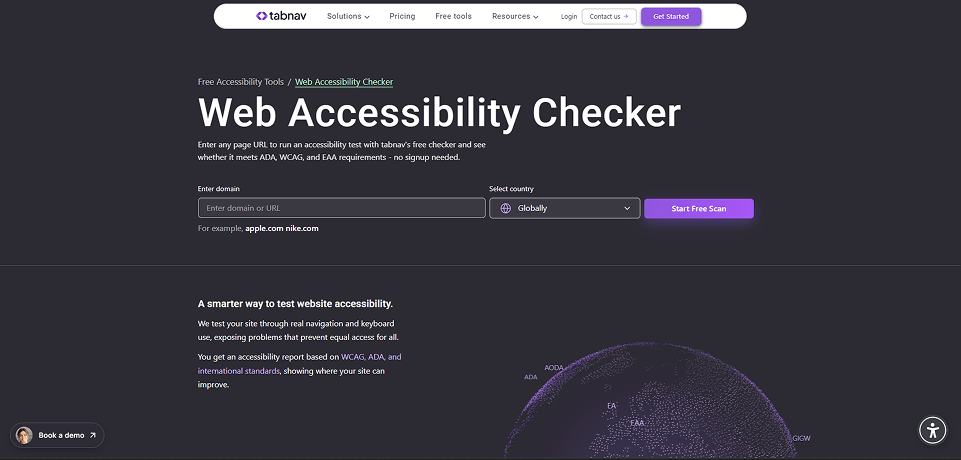
Tabnav Accessibility Checker is built to address the gap between checklist-based ADA audits and real user experience.
Most accessibility tools focus on surface-level code checks. They identify missing attributes or contrast issues but fail to detect what happens when users actually interact with a site. Tabnav goes further by combining WCAG-based scanning with simulated real user behavior.
The checker actively navigates your website using keyboard interaction, opens menus, triggers buttons, moves through forms, and evaluates focus behavior across dynamic components. This allows it to uncover accessibility failures that only appear during interaction, including broken keyboard navigation, unstable focus order, and inaccessible modals.
By testing both the underlying code and the way users move through your site, Tabnav Accessibility Checker provides more accurate audit results and clearer guidance on what needs to be fixed to meet ADA requirements.
Final Thoughts
An ADA compliance audit is only effective when it reflects how people actually experience your website.
Audits that rely only on technical checklists often miss the barriers that prevent users from navigating, interacting, and completing tasks. Those gaps are where accessibility breaks and where risk begins.
By combining structured auditing with real interaction testing and ongoing monitoring, teams can maintain accessibility over time instead of reacting to issues after they appear.
That approach leads to better usability, stronger compliance, and digital experiences that work for everyone.

You might also like...